
You have a good business, happy customers, maybe an Instagram page. But new people in your city still don’t know you exist. Meta ads — paid ads on Facebook and Instagram, run from one place, with enquiries that can land straight on your WhatsApp — are one of the fastest ways to put your business in front of the right local people. You choose who sees the ad, you set the budget, and you can stop any time.
The problem: most first campaigns waste money because of a few simple mistakes. This guide is the plan we follow ourselves, in plain words.
Boost button vs Ads Manager
The “Boost post” button on Instagram is easy, but it gives you very little control. Meta Ads Manager (on the website, or the Meta Business Suite app) lets you pick the real goal, the exact area, the placements and the budget, and it shows proper reports. If you are serious about getting customers, use Ads Manager.
What you need before your first ad
- A Facebook Page for your business, linked to your Instagram business account.
- WhatsApp Business on your business number, if you want enquiries on WhatsApp (most Indian customers do).
- A payment method added in Ads Manager (UPI or card, as Meta allows). Your ad budget is paid to Meta directly.
- A clear offer: what you sell, for whom, and why someone should message you today.
- 2–3 creatives: a short vertical reel and one or two clean images.
Step 1: Pick the right goal
When you create a campaign, Meta asks for an objective. This one choice decides who Meta shows your ad to.
- Engagement → messages: best for most local businesses. People tap the ad and a WhatsApp or Instagram chat opens with you.
- Leads: an instant form inside Facebook or Instagram collects name and phone number. Good for coaching, real estate and clinics — but call the leads quickly.
- Traffic: sends people to your website. Use it only if your website is fast and has a clear “call” or “WhatsApp” button.
- Awareness: shows the ad to as many people as possible. Useful for a launch or event, not for direct enquiries.
Step 2: Target your real area
A business in Mirzapur does not need clicks from Mumbai. In the ad set, set the location to your city, or a radius around your shop (for example, 5–15 km). Choose “people living in or recently in this location”.
Keep the age range sensible for your customer, and don’t add ten narrow interests. Meta’s system has become good at finding buyers on its own once your area, goal and creative are right. Too many filters usually make results costlier, not better.
Step 3: Make creatives that stop the scroll
The creative does most of the work. A few rules that work for Indian audiences:
- Vertical video first. A 15–30 second reel shot on a phone often beats a polished poster.
- Hook in the first 2 seconds: a question, a before/after, or your product in hand.
- Speak your customer’s language. Hinglish or Hindi captions are completely fine — even better for many local audiences.
- Show real things: your shop, your team, your product. Real beats stock.
- One clear action: “Message us on WhatsApp”, “Book a visit”, “Call now”.
Step 4: Start small and test
Start with a small daily budget you are comfortable with, one campaign, and 2–3 ads inside it. Let it run for a few days before you judge it — Meta needs some time to learn who responds. Then keep the ad that brings the most messages at the lowest cost, pause the weak ones, and add a new creative every week or two so people don’t get bored of the same ad.
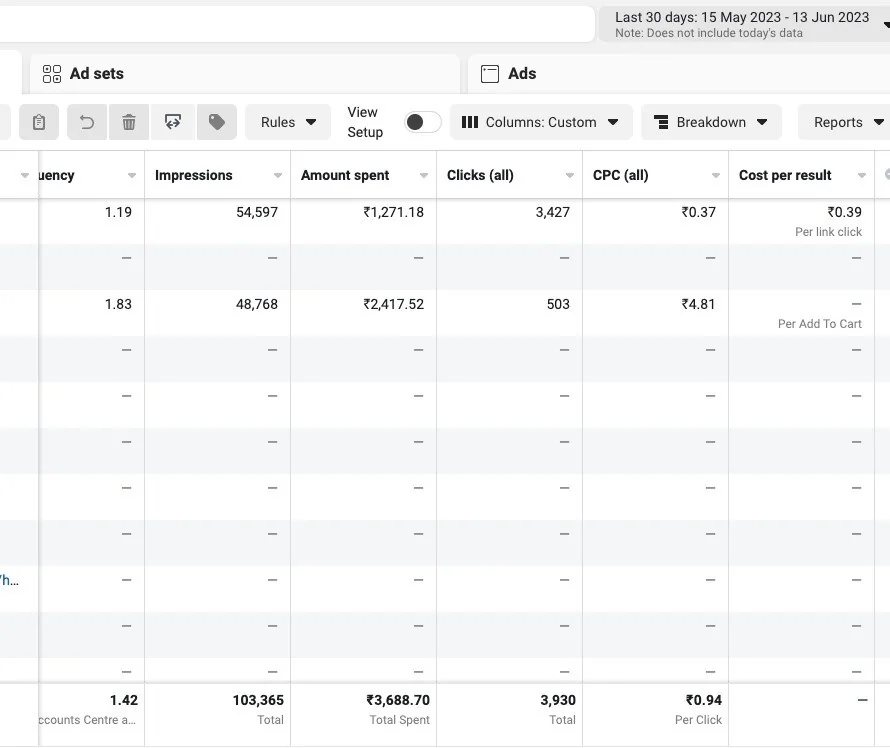
Our own test: in one month of Meta ads (15 May – 13 Jun 2023) we spent ₹3,688.70 and got 1,03,365 impressions and 3,930 clicks — about ₹0.94 per click. That came from tight local targeting, simple creatives and checking the numbers every few days. Your result will depend on your business, offer and budget; see the full case on our Work page.
Step 5: Track what matters
Likes feel good but don’t pay the rent. In Ads Manager, watch these:
- Cost per result — cost per message, per lead or per click, based on your goal.
- CTR (click-through rate) — if very few people click, change the creative.
- Frequency — if the same people have seen your ad many times, refresh it.
- Real customers — ask every new enquiry “Where did you see us?” and write it down.
Common mistakes to avoid
- Boosting a random post without a goal or offer.
- Targeting all of India when you serve one city.
- Replying to WhatsApp enquiries after hours — reply fast, or the lead goes cold.
- Changing the ad every day. Give it a few days.
- Running ads about elections or social issues without Meta’s authorisation. These ads need the “Paid for by” disclaimer and the advertiser verification Meta asks for in India.
Quick answers (FAQ)
Are Facebook ads and Instagram ads the same thing?
Both run from the same place, Meta Ads Manager. One campaign can show your ad on Facebook, Instagram and Messenger, or only on the placements you choose.
How much should a small business spend on Meta ads?
There is no fixed number. Start with a small daily budget you are comfortable losing while you test, run it for a few days, and increase it only on the ads that bring real enquiries.
Can Meta ads bring customers on WhatsApp?
Yes. Choose a messages goal and pick WhatsApp as the place people message you. When someone taps the ad, a chat with your business number opens, with a ready message.
How soon will I see results?
Clicks and messages usually start within a day or two of the ad going live. Give a new campaign a few days to settle before judging it, and a few weeks of testing creatives to find what works best.
Want us to run it for you?
Our team plans, designs and runs Meta ads for local businesses — the creatives, the targeting, daily checks and an honest report. Book a short call on WhatsApp and tell us what you sell and where.